> ## Documentation Index
> Fetch the complete documentation index at: https://docs.minoa.io/llms.txt
> Use this file to discover all available pages before exploring further.

# Sending Customer Surveys

Learn how custom surveys make it easier for customers to share inputs through a branded, professional experience, while helping your team turn responses into reusable value data. <br />

<iframe src="https://www.youtube.com/embed/e4-p2CIR-ek" title="YouTube video player" frameborder="0" className="w-full aspect-video rounded-xl" allow="accelerometer; autoplay; clipboard-write; encrypted-media; gyroscope; picture-in-picture; web-share" allowfullscreen />

## What to use Custom Surveys for?<br />

With Custom Surveys, you can gather both quantitative and qualitative information to help inform your business cases and overall customer strategy.

* Pre-Sales:
  * Gather baseline data from prospects to help make your business case even more credible
* Post-Sales
  * Gather baseline info from existing customers if you don't have any baseline information
  * Level set information with different and new stakeholders
  * Get updated information to better inform engagements, upsells/expansions, and renewals

## How to Create and Use Custom Surveys

<Steps>
  <Step title="Navigate to your opportunity's deal page. ">
    If logging directly into [Minoa](app.minoa.io), click on the opportunity you want to work on and you'll be directed to the deal page hub.
  </Step>

  <Step title="Scroll down to 'Customer Surveys'" />

  <Step title="You can select a template and modify as you see fit or create your own custom survey." />

  <Step title="Add metrics (tied to your company's value framework's use cases/calculations) " />

  <Step title="Add any qualitative questions (other metrics you'd like to gather and any other question(s) that would be helpful for you to understand how to help your customer). " />

  <Step title="Once you've finished building your survey, select 'Launch Survey'" />

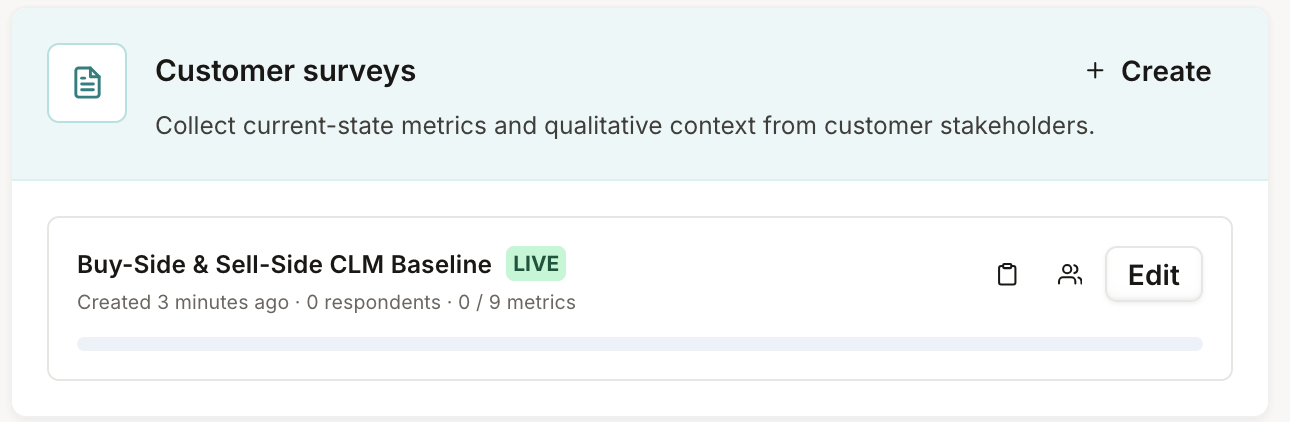
  <Step title="You'll be redirected back to the deal page hub. Hover over the clipboard to copy your survey link and send to your stakeholder(s). ">
    <Frame>
      <img src="https://mintcdn.com/minoa/o1Q112sKwEVc5mfC/images/CleanShot-2026-08-18-at-13.34.32@2x.png?fit=max&auto=format&n=o1Q112sKwEVc5mfC&q=85&s=9289a6050972c4ba1c4472d2d94c606b" alt="Clean Shot 2026 08 18 At 13 34 32@2x" width="1290" height="422" data-path="images/CleanShot-2026-08-18-at-13.34.32@2x.png" />
    </Frame>
  </Step>

  <Step title="You'll get a notification when your customer responds. When you click on the person icon, you'll be able to view the responses and import specific answers to your business case. " />
</Steps>
