
Why track milestones?
Not everything that matters shows up in your benefit calculations. Milestones give you a way to acknowledge important checkpoints like:- All departments onboarded
- 75% monthly active users achieved
- Integration with CRM completed
- Executive sponsor alignment secured
- First quarterly business review completed
Milestone types
You’ll work with two types of milestones in your business case:Global milestones
These apply across the entire business case and typically represent account-wide achievements. Common examples:- Contract kickoff completed
- Executive sponsor identified
- Initial team training delivered
- Quarterly business review conducted
- Renewal discussion initiated
Use case milestones
These are linked to specific use cases and reflect key moments in rolling out that particular feature or capability. Common examples:- Feature enabled for pilot team
- Workflow integration completed
- Champion training completed
- Department-wide rollout finished
- First success story documented
Linking matters: Use case milestones help you understand which implementation activities drove improvements in
specific measurements during certain periods.
Milestone structure
Every milestone has these key fields:
Together, these fields help you track whether value realization is on schedule—and surface delays before they impact your renewal.
Creating milestones
You have several ways to add milestones to your business case:From a template
Your organization’s value framework can include milestone templates that give you a head start.1
Open your business case
Navigate to the business case where you’re tracking value realization.
2
Go to the Milestones view
Open the Milestones view in your business case.
3
Start creating a milestone
Click the Milestone button (with the + icon) to open the create milestone modal.
4
Import a template
In the modal header, click Import, then choose the milestone template that matches your customer’s implementation type or product tier.
5
Create
Review the pre-filled details, adjust start and planned end months and related use cases if needed, then click Create.
The milestone is added from the template. You can edit it anytime from the Milestones view.
Manually
Create milestones directly at any time.1
Go to the Milestones view
Open the Milestones view in your business case.
2
Click Milestone
Click the Milestone button (with the + icon).
3
Fill in details
- Enter the milestone name
- Set Start Month and Planned End Month
- Optionally select one or more Related Use Cases (leave empty for a global milestone)
4
Create
Click Create to add the milestone.
Managing milestones
Updating dates and details
1
Find the milestone
Navigate to the Milestones view.
2
Click to edit
Open the milestone menu and choose Edit milestone.
3
Update fields
- Adjust Start Month or Planned End Month
- Add or change End Month when marking complete
- Update the name
- Change Related Use Cases (clear selections for a global milestone)
4
Save changes
Click Save to update the milestone.
Marking milestones complete
When you complete a milestone, record the end month:- Open the milestone editor
- Use Mark Milestone completed or set End Month to the month it was completed
- Click Save
What if we completed a milestone early or late?
What if we completed a milestone early or late?
That’s valuable information! The difference between Planned End Month and End Month helps you:
- Identify implementation delays that might affect renewal
- Recognize areas where rollout went smoother than expected
- Adjust future milestone projections for similar customers
Checking off milestones
For quick updates, you can check off milestones without opening the full editor:- Navigate to the Milestones view
- Click the checkbox next to any milestone
- The end month is automatically set to the current month
Deleting milestones
Need to remove a milestone that’s no longer relevant?- Navigate to the Milestones view
- Find the milestone you want to remove
- Click the 3-dot menu next to it
- Select Delete
- Confirm the deletion
Viewing milestone progress
The Milestones view shows all milestones in one place:- Global milestones at the top
- Use case-linked milestones grouped by use case below
- Completed milestones show with a checkmark and completion month
- Summary cards at the top show completion progress and how many milestones are delayed (past planned end, not completed)—individual milestone cards do not change color for delays
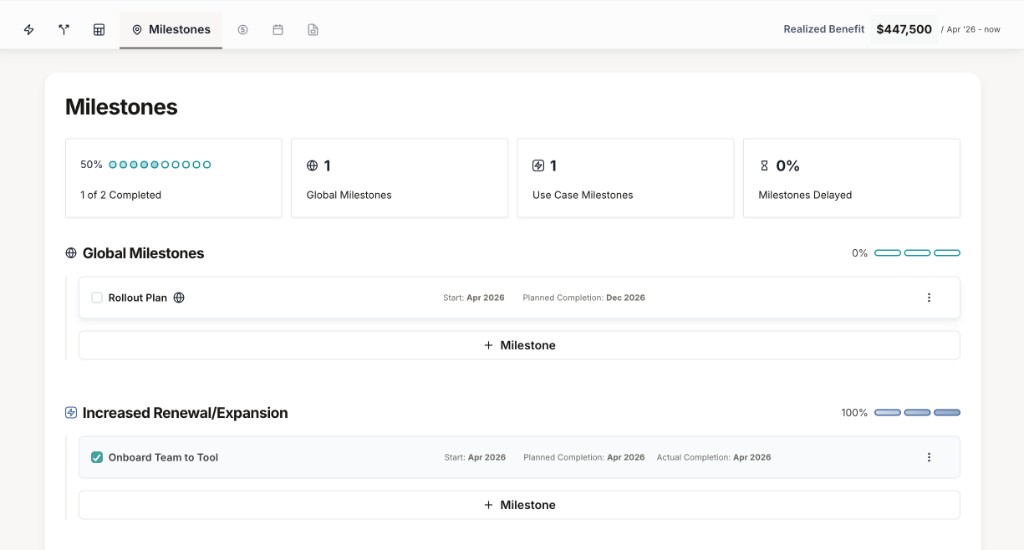 This view gives you a quick status check for the entire implementation alongside your Value Summary.
Best practices
Be realistic with dates
Set planned end months based on actual implementation timelines, not wishful thinking. Realistic projections
help you spot delays early.
Update regularly
Check off milestones as soon as they’re completed. Stale milestone data loses its value as a progress indicator.
Link strategically
Connect milestones to use cases when there’s a clear relationship. This helps explain why measurements improved
(or didn’t) in certain periods.
Keep it focused
Don’t create milestones for every minor task. Focus on checkpoints that truly matter to value realization and
customer success.
Common milestone patterns
Different implementation approaches call for different milestone structures. Here are proven patterns:- Phased rollout
- Integration-heavy
- Adoption-focused
- Change management
Scenario: Rolling out to multiple teams or departments over time.Milestone pattern:
- Pilot team selected
- Pilot team onboarded (linked to first use case)
- Pilot success documented
- Department 1 rollout completed
- Department 2 rollout completed
- Full organization rollout completed
- 80% adoption achieved across all teams
Milestones in storytelling
When you present value realization to your customer, milestones provide critical context: Without milestones: “Your benefit increased from 20,000 in September.” With milestones: “Your benefit increased from 20,000 in September—right after we completed the Department 2 rollout in August and achieved 75% adoption across both teams.”Troubleshooting
Can't find a milestone I created
Can't find a milestone I created
Open the Milestones view—milestones are listed there, grouped under global milestones and by use case when
linked.
Milestone shows on wrong use case
Milestone shows on wrong use case
Edit the milestone and update Related Use Cases to the correct use case(s), or clear all selections to make it
a global milestone.
Want to uncheck a completed milestone
Want to uncheck a completed milestone
Edit the milestone and clear completion (for example, use Mark as incomplete in the editor). The milestone
returns to uncompleted status.
Template milestones don't fit my customer
Template milestones don't fit my customer
After importing from a template, you can edit, delete, or add milestones freely. Templates are starting points,
not requirements.
Milestones set up! Combine them with monthly measurements to tell the
complete value story—financial impact backed by implementation context. Heading into a renewal or upsell? See
Upsells and renewals to use that story in the next contract
conversation.