
Every use case runs on inputs. Monthly active users, conversion rate, margin, churn. When your buyer asks where a number came from, you need the answer on the spot.
You can always ask the agent. Now you don’t have to. The source of every input sits right next to it in the business case.
Find the sources
1
Open the business case
Select the Value Summary tab, or scroll down to your use cases.
2
Open the inputs on a use case
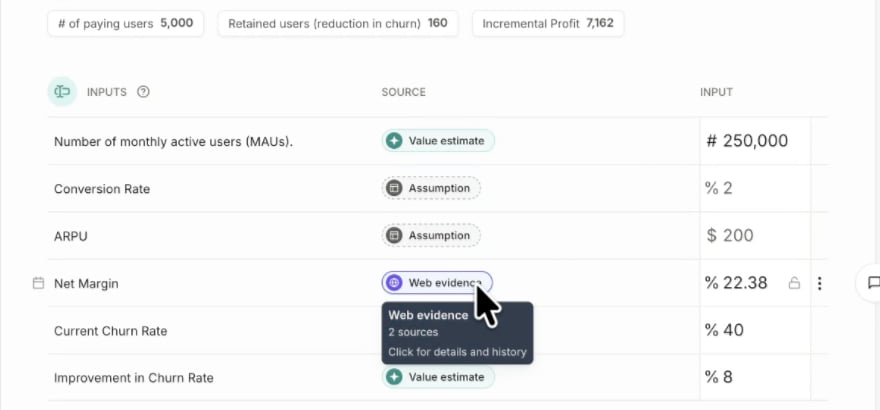
Every use case lists its inputs with a Source column next to each value. Click Show inputs if they’re collapsed.
3
Read the source
Each input carries a badge that tells you where the number came from. Hover a badge for a quick summary. Click it for the full story.
What each source means
Any time an input changes, the source updates with it. The badge always reflects where the current number came from.
Dig into a source
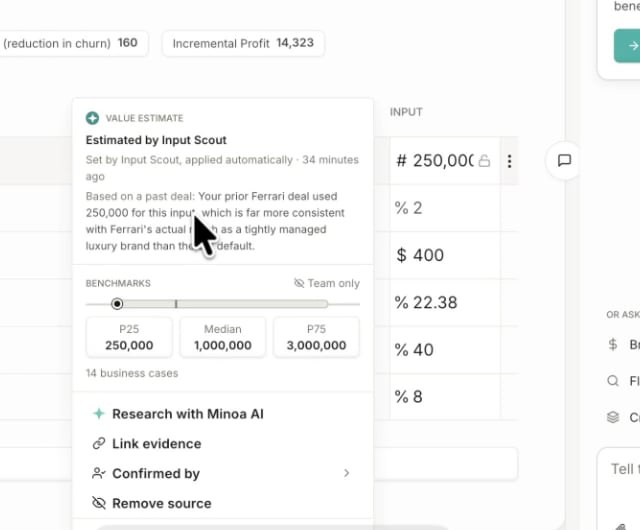
Click any source badge. You’ll see why the value was set, who or what set it, and when. Value estimates also show benchmarks from your team’s business cases: the low, median and high values used for that input. Benchmarks are visible to your team only. From the same panel you can back the number up:Or ask the agent
The agent still works if you’d rather talk it through. A few prompts that work well:- “Walk me through every input in this business case and where each one came from.”
- “Which inputs should I validate with my customer before the next call?”
- “What changed since the last time I talked to the customer and updated the business case?”
Tips
Validate assumptions before the buyer sees them
Validate assumptions before the buyer sees them
A value estimate or web evidence has something behind it. An assumption doesn’t. Walk those with your champion first.
Get the customer's name on the big inputs
Get the customer's name on the big inputs
A number your buyer’s team confirmed is much harder to push back on than one you brought in. Use Confirmed by on the inputs that drive most of the benefit.
Check the history before a review
Check the history before a review
Before you send the case to an economic buyer, open View value history on the inputs that moved. Know what changed and why before they ask.